

&w=3840&q=75)
video
Campaign work runs on layered design files, video cuts and agency exports. The marketing space overrides the global rule for those types only, and every other space stays as strict as it was.
The exception has a boundary
A rule with no exception does not get followed. It gets worked around, and the workaround is worse.
Large design and video formats are kept out on purpose. Marketing is the one space where they are the work itself.
Someone asks an admin, waits, and explains it again next quarter. In the meantime the file goes somewhere else.
A transfer link in a comment becomes the delivery route. Nobody knows what is behind it or how long it stays alive.
Pick the marketing space, pick the types it runs on, set them to Allowed and tick Override global configuration. The global rule is left untouched.
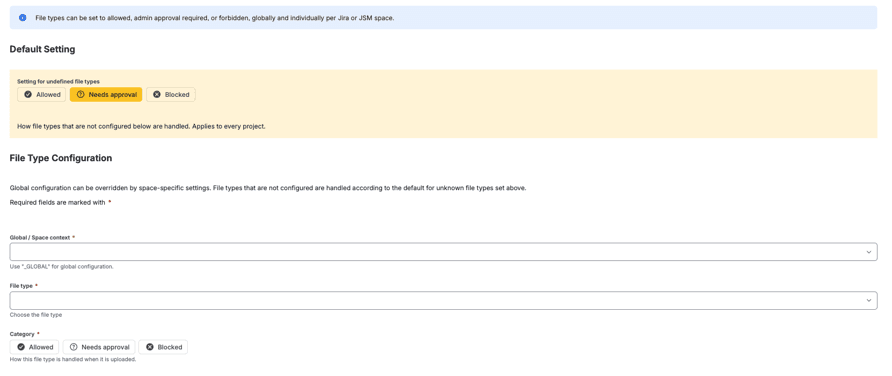
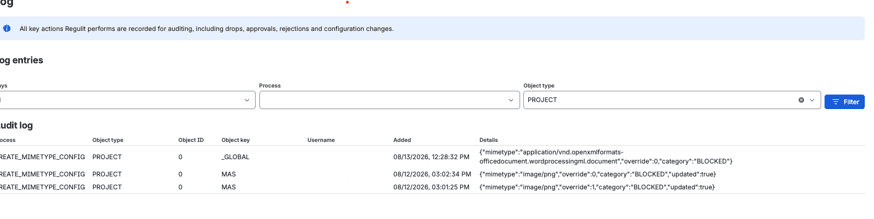
The point of a space level override is that someone can check it. Both the rule and every removal under it are recorded.
Design tools write the same format under several names. Regulit looks at the type Jira reports and at the file extension.
When type and extension disagree, the stricter rule applies.
One file type can cover several mimetypes, so one entry handles every name a tool gives the format.
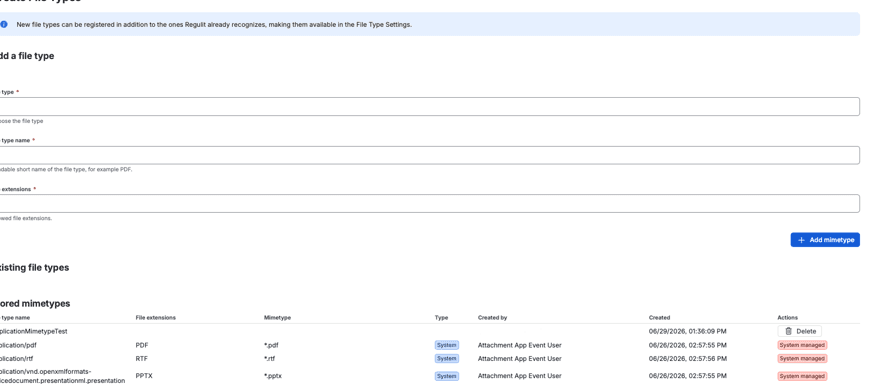
A Jira admin adds it under Create File Types, with mimetype, name and extension. From then on it is selectable in every space.
A format nobody has configured follows Setting for undefined file types, which ships as Needs approval. With storage connected, the first file of a new format waits for a decision. Without storage it is removed.
Yes. Set the type to Allowed in that space and tick Override global configuration.
No. It applies to that one space.
A Jira admin adds it under Create File Types, with mimetype, name and extension.
No size rule. An allowed file stays at any size. Above 50 MB a file cannot be held for approval.
No. A file type you add is matched on mimetype and extension only.
Read on
This page argues the case for a space level exception. What the app does with the rule, and what it takes to switch it on, each have a page of their own.
Set a design format to allowed for a single space and upload it. Try the same file in another space and watch it leave.
&w=3840&q=75)
&w=3840&q=75)