
Set the rule once. Regulit applies it to every upload
Every file type is Allowed, Needs approval or Blocked. Regulit checks each attachment right after the upload, comments on the work item and writes the log.
Built on Atlassian Forge, storage in your own cloud
What happens to every file after the upload
Five steps. The content check runs only when it is switched on.
1. Jira stores the file
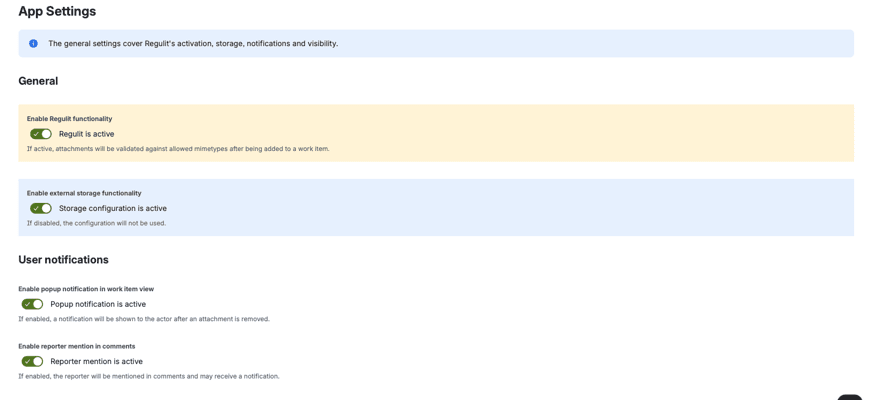
Regulit reacts to the attachment event right after the upload. A Forge app cannot sit in front of the upload, so the file is on the work item for a moment. With the master switch off, nothing below happens.
2. The rule applies
Regulit reads the category for the file type: the global rule, or the space rule where Override global configuration is ticked. Type and extension are compared, the stricter rule applies.
3. The content check
If it is on, Regulit compares the first bytes of every file that is not Blocked with its extension and type. A disguised file is blocked or sent to review. Files above 50 MB are not read.
4. The outcome
Allowed stays on the work item. Needs approval is kept in your storage and taken off the work item. Blocked is removed and not kept. Without storage, Needs approval is handled like Blocked.
5. Comment and log
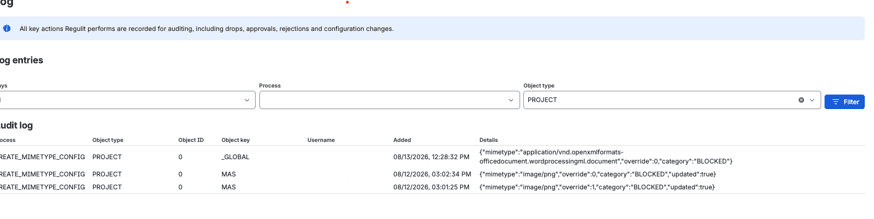
A comment names the file, what happened and the rule. It is public when a customer uploaded and internal when an agent did. The log records file, file type, rule, person and time.
&w=3840&q=75)
&w=3840&q=75)
&w=3840&q=75)
&w=3840&q=75)
&w=3840&q=75)
Type and extension decide. The rest is recorded.
What the outcome depends on, and what is only written down.
| Input | Role | Detail |
|---|---|---|
| File type | Decides | The type Jira reports, matched against the category you set |
| Space of the work item | Selects the rule | The global rule, or the space override |
| First bytes | Decides, if content check is on | Compared with extension and type. A mismatch is treated as a disguise |
| File extension | Decides too | When type and extension disagree, the stricter rule applies. For plain text, the extension decides |
| File size | No rule | Above 50 MB a file is not read and cannot be held for approval |
| Who uploaded | Recorded | Named in the comment and the log, never part of the rule |
A file type can cover several mimetypes. When you set it, all of them get the same category.
The name agrees. The bytes do not.
A renamed program still starts with the bytes of a program. The content check reads them.
- Three facts. Extension, declared type and the first bytes of the file. 4D 5A is a Windows executable, whatever the name says.
- One consequence. On a content mismatch decides whether a disguised file is blocked at once or sent to review.
- The uploader is named. When the check finds a disguised file, the comment always names who uploaded it.
One global rule, one space that disagrees.
Switch between global and space, flip a type and see which rule wins.
| State | Restorable |
|---|---|
| PENDINGheld in your storage, waiting for a decision | yes |
| APPROVEDapproved and put back on the work item | yes |
| REJECTEDrejected, the object is deleted | no |
| EXPIREDthe window closed, the object is deleted | no |
| DROPPEDnever stored, not recoverable | no |
Retention window defaults to 10 days and is set per storage configuration.
The global rule is the default for the whole site. A space rule with Override global configuration decides that type for that space. 22 common types are preset.
Approvals
Removed is not the same as gone.
The category decides whether a file waits for a decision or leaves for good.
 The queue holds what needs approvalApprove puts the file back on its work item, Reject deletes the stored copy. Undecided files expire after the review window.Who may decideSpace admins, and service desk agents if you switch that on. Other space members can be allowed to see open approvals, never to decide.
Every change, with user and timestamp.
This is the part a security review asks for: proof that the rule works, not a document that says it should.
- Every action. Removals, holds, approvals, rejections and settings changes, each with who did it and when.
- Filterable. By time range, process and object type, newest first. There is no export yet.
- System, when it was the rule. Automatic removals are recorded as System. You can also show System instead of the admin who acted.
Everything in this log follows from the rules you set once. Setting up takes about ten minutes.
What people ask at this point
Why does the file appear in Jira at all?
A Forge app cannot sit in front of the upload. Jira stores the file first, and Regulit removes it right after.
Does the master switch stop everything?
Yes. While it is off, no attachment is checked.
Can we set a size limit?
No. Files above 50 MB are not downloaded, so they cannot be held for approval.
Does it replace antivirus?
No. It checks file types and file signatures, not malware.
Can we export the log?
Not yet. You read and filter it on the Log tab.
See it on your own file types.
Set one type to Blocked in a test space, switch Regulit on and upload a file. No storage needed for that part.